


If you’ve been struggling to push your Next.js app from the dreaded orange zone (80s) into the green zone (90+) on Google PageSpeed Insights, you’re not alone.
I tried every common performance tweak:
Optimizing next.config.js
Profiling heavy components and splitting code
Using
dynamic()withsuspensefor lazy loadingApplying Next.js Image Optimization
And still, my app hovered around 82/88 performance score.
The real breakthrough came when I discovered the experimental inlineCss feature in Next.js.
What is inlineCss in Next.js?
According to the Next.js documentation
Definition:
inlineCssinlines CSS directly into the rendered HTML instead of linking to external.cssfiles.Benefit: Eliminates extra network requests for CSS, which reduces render-blocking resources.
Performance Gains: Improves First Contentful Paint (FCP) and Largest Contentful Paint (LCP) — two critical Core Web Vitals.
Best Use Cases:
Small-to-medium apps (e.g., portfolios, landing pages, dashboards)
Projects where fast initial render is more important than keeping HTML payload smaller
Caution: For apps with huge global stylesheets, HTML size may increase.
How to Enable inlineCss in Next.js
Add the following to your next.config.js (or next.config.ts):
// next.config.js
const nextConfig = {
 experimental: {
 inlineCss: true,
 },
}
export default nextConfig
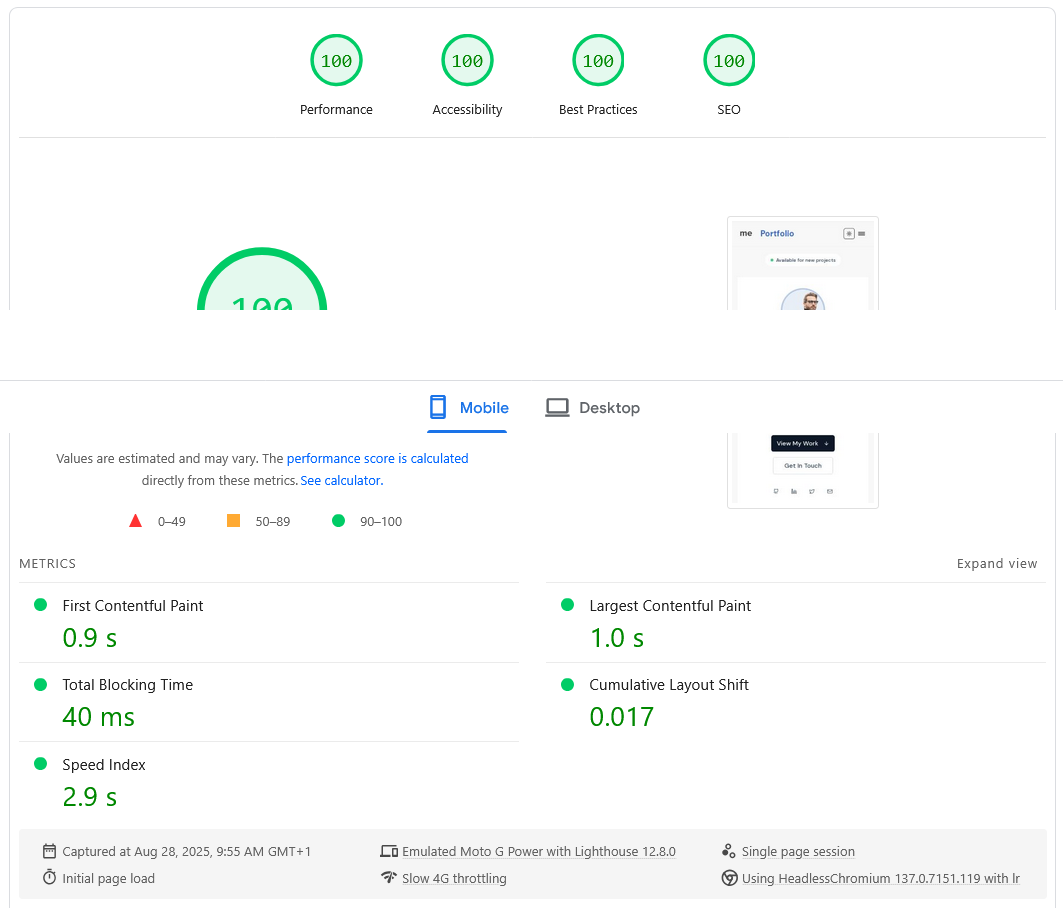
After enabling inlineCss, my Next.js app finally broke through into the green zone (90+ score) on Google PageSpeed Insights 🎉.
Before:
Score: 88–89 (orange)
FCP/LCP: slowed by CSS request
After:
Score: 90+ (green)
Faster First Contentful Paint (FCP)
Improved Largest Contentful Paint (LCP)
More stable rendering, reduced layout shift
After enabling this, my app jumped into the green zone (90+).
Why This Matters
For developers aiming to improve Next.js performance and optimize Core Web Vitals, CSS delivery is often an overlooked bottleneck.
My application: Me Portfolio, get if from Gumroad
Key Takeaways
Don’t stop at image optimization and dynamic imports.
Test experimental features—sometimes they solve the exact bottleneck.
inlineCssis especially powerful for smaller apps, where CSS size isn’t huge.Always re-test with Google PageSpeed Insights after each change.
Sometimes it’s not about piling more optimizations, but finding that one bottleneck and in my case, it was CSS delivery.
About the author
- I am a web developer
Comments
Join the discussionNo comments yet. Be the first to comment.

